

Introduction
Modern businesses depend on cloud platforms, shared files, payment systems, customer databases, and remote teams. These tools improve speed and teamwork, but they also create an important responsibility: every company must know who can view, change, or approve sensitive information. RWU UAR provides a practical way to understand this challenge by connecting permission levels with regular user access reviews. Although the term is not a universal industry standard, it can be used as a clear framework for checking whether employees, contractors, guests, and software accounts have suitable access. In 2026, this process matters because companies use more online services than ever. A well-managed review system can protect private data, reduce mistakes, support audits, and revoke access when a worker changes roles or leaves the company.
What Does RWU UAR Mean?
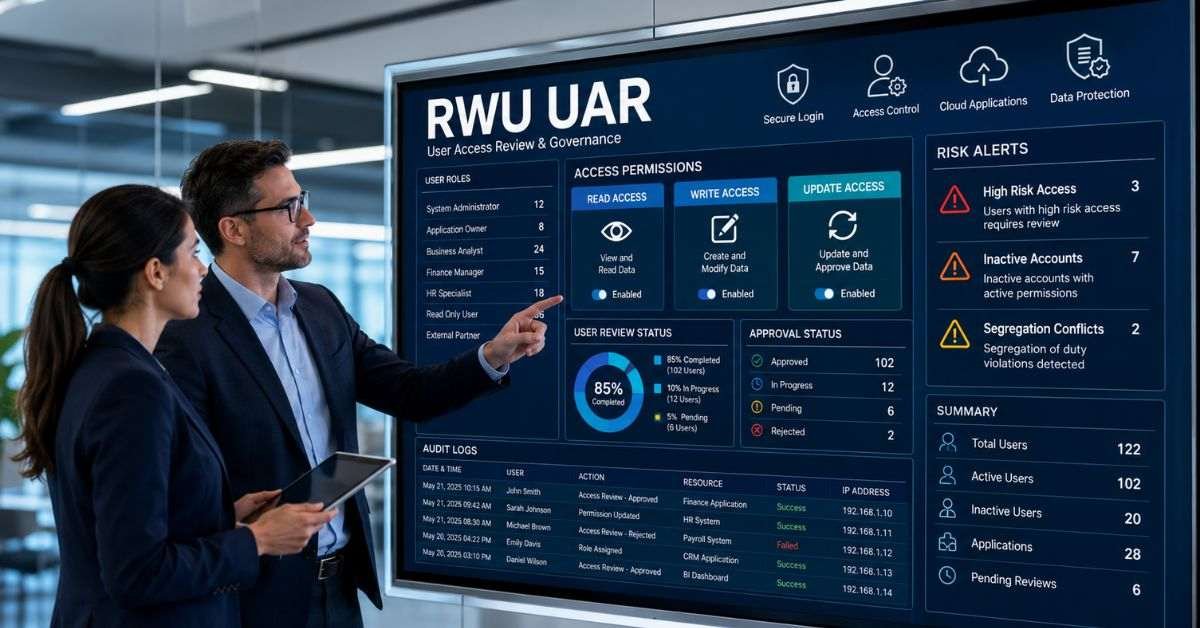
In this guide, RWU UAR combines read, write, and update permissions with a user access review. Read permission allows someone to view the information. Write permission allows new information to be added. Update permission lets a user change records that already exist. The access review checks whether these rights are still needed. The main goal is to give each person only the access required for their current job. For example, a sales employee may need to view customer details but should not automatically be allowed to change bank information or approve refunds.
Why Access Reviews Matter
Access rights often increase over time. A worker may join a temporary project, move to another department, or receive extra control during an urgent task. If those permissions are not removed later, the account can become more powerful than necessary. RWU UAR helps businesses create a regular checking process.
Its main benefits include the following:
- Protecting customer, employee, and financial information
- Finding inactive, duplicate, or forgotten accounts
- Reducing fraud, errors, and unauthorized changes
- Creating clear records for audits
- Removing access after a role change or departure
A thorough review process should improve security without making normal work difficult.
Understanding Permission Levels
Different permissions create different levels of risk. Viewing a report is not the same as changing prices, deleting customer records, or approving payments.
| Permission | What It Allows | Business Example | Main Risk |
| Read | View information | Reading a sales report | Private data exposure |
| Write | Add information | Creating a customer record | Incorrect data |
| Update | Change saved information | Editing payment details | Fraud or major errors |
| Admin | Control users or actions | Approving payments | Serious misuse |
RWU UAR makes these differences easier for managers to understand. High-risk permissions should receive stronger approval, closer monitoring, and more frequent reviews. Businesses should also use separation of duties. This means one employee should not control every step of an important activity. For example, the same person should not create, edit, and approve a large payment.
How the Review Process Works
A useful RWU UAR review follows a clear sequence:
- Choose the systems, users, and review dates
- Collect current accounts, roles, groups, and permissions
- Ask managers or system owners to check every user
- Approve, reduce, remove, or extend access
- Confirm that every approved change was completed
Each decision should include a short explanation. ““Approved because employee prepares monthly payroll reports” is more helpful than a yes/no. Clear explanations help managers, security teams, and auditors understand why access was kept or removed.
Who Should Be Responsible?
IT teams should not make every access decision alone. They understand the technology, but department managers usually understand the employee’s actual duties. RWU UAR works best when responsibility is shared:
- Managers confirm whether access matches the employee’s role.
- System owners explain what each permission allows.
- IT teams apply approved changes
- Security teams review unusual or high-risk accounts.
- HR teams report job changes and departures.
- Compliance teams verify records and missed deadlines.
Users should not approve their own high-risk access. Every important business system should also have a named owner who is responsible for completing reviews.
How Often Should Reviews Happen?
The review schedule should depend on the risk connected with each account or system.
| Access Type | Suggested Review Cycle | Example |
| Administrator access | Every month | Cloud or payment administrator |
| High-risk system access | Every three months | Payroll database |
| Standard employee access | Every six months | Shared drives and team apps |
| Low-risk access | Once a year | Public content tools |
| Temporary access | At its expiry date | Contractor account |
RWU UAR should also be performed after an employee leaves, changes jobs, completes a project, or becomes connected to a security incident. These event-based reviews can be more urgent than the normal review schedule. A former employee should not keep access until the next yearly evaluation.
Using Automation Carefully

A spreadsheet may work for a small company with only a few workers and applications. However, manual reviews become difficult when the business has hundreds of users, contractors, and cloud tools.
Automation can support RWU UAR by:
- Alerts for inactive or unusual accounts
- Automatic expiry dates for temporary users
- Reminders for managers and system owners
- Reports showing late decisions
- Records of completed access changes
Human judgment is still necessary. Software may report that an account has not been used recently, but a manager may know that the employee is on medical leave or waiting for a project to restart. Automation should support decisions rather than decide everything without human review.
Common Problems and Practical Solutions
Many access reviews fail because technical role names are difficult to understand. To a department manager, a tag such as “FIN-AP-02” may not mean much. It should be explained as “Can create and approve supplier payments.” Other common problems include managers approving everyone without checking, guest accounts staying active forever, service accounts having no owner, and removed permissions remaining available.
RWU UAR becomes more effective when businesses use plain descriptions, set clear deadlines, assign responsible owners, and confirm that each approved removal has actually happened. Temporary users should also receive an expiry date when their accounts are created. This prevents contractors and vendors from keeping access after their work ends.
How to Measure Success
A company should measure real results instead of only counting completed forms. Useful performance measures include the percentage of reviews finished on time, the number of inactive accounts removed, the number of administrator roles reduced, and the time required to revoke access after an employee leaves.
RWU UAR is successful when employees can complete their work while unnecessary rights become easier to identify and remove. A large number of removed accounts does not always prove that the process is successful. The better goal is to create access that is suitable, clearly approved, and easy to explain. Businesses should also check whether approved changes were completed. A decision to revoke access has little value if the account remains active.
A Simple 30-Day Business Plan
A company does not need to review every system at once. It can start with one major application such as payroll, client management or cloud administration.
- Week 1: Choose one system and list every user and permission
- Week 2: Find inactive, temporary, guest, and high-risk accounts
- Week 3: Approve, reduce, or remove each permission
- Week 4: Confirm the changes and schedule the next review
After the first RWU UAR project is complete, the same method can be used for customer databases, shared drives, finance systems, cloud tools, and human resources platforms. Starting with one system allows the company to test the process, resolve problems, and train reviewers before expanding the program.
FAQs
Is RWU UAR an official business standard?
No. It is a practical framework used in this guide to explain permissions and user access reviews.
What access should a company review first?
Administrator accounts, financial systems, customer databases, visitors, and dormant users should come first.
Can a small business use a spreadsheet?
Yes. A spreadsheet can work when the company has a limited number of users and applications.
Who should approve employee access?
A manager or system owner should approve it, while security teams should review high-risk permissions.
What is the main purpose of an access review?
The purpose is to keep necessary access while removing permissions that are outdated, excessive, or unsafe.
Conclusion
RWU UAR gives businesses a clear method for connecting permission levels with regular access checks. It helps leaders understand who can read, add, change, or approve important information. It also supports the removal of old accounts, the control of temporary users, and the review of high-risk roles. In 2026, companies depend on cloud services, remote work tools, automated accounts, and outside contractors. Access control must therefore become an ongoing responsibility rather than a one-time task.
Begin with one critical system. Please provide the list of users of the crucial system, explicitly state each permission, have the appropriate management examine it and ensure that all allowed modifications are made. Once the first RWU UAR review works well, repeat the process across other business systems. This practical approach can improve security, create clearer records, and make daily operations safer.